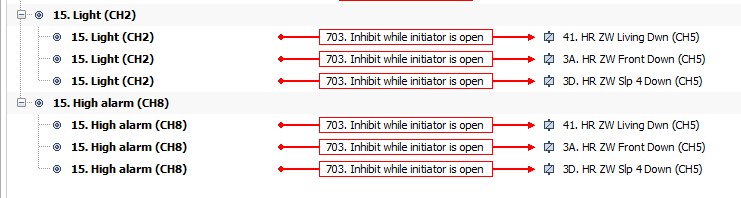
Attached a file with part of my Velbus installation. Blinds of module 07 are now manually controlled via buttons on the VMBGP4-20.
How to automate this based on time, light & temperature?
Something like:
a) from, let say 19:00 in the evening of day one and 08:00 in the morning of the next day, always open
b) when light intensity of the VMBPIRO-20 drops below 250 and outside temperature is above 20°C and inside temperature is above 23°C, close the blind
c) manual mode via buttons, but that is working fine
Being new to Velbus it’s unclear to me how to configure conditions a & b in combination with c.
Give me an Allen Bradley or Siemens PLC and the job is done in 2 minutes.
But with Velbus… …
Thanks a lot to add the necessary actions in the file for one blind so that I can learn from it and program all other blinds myself.
Regards
Alain
If virtual relays are needed, I also have 5 VMB4RYLD-10 modules and a second VMBGPO-20 in the installation.
Closing of the blind based of ONLY outside temperature is ok using the “High alarm” output channel of the VMBPIRO-20.
To add the room temperature…
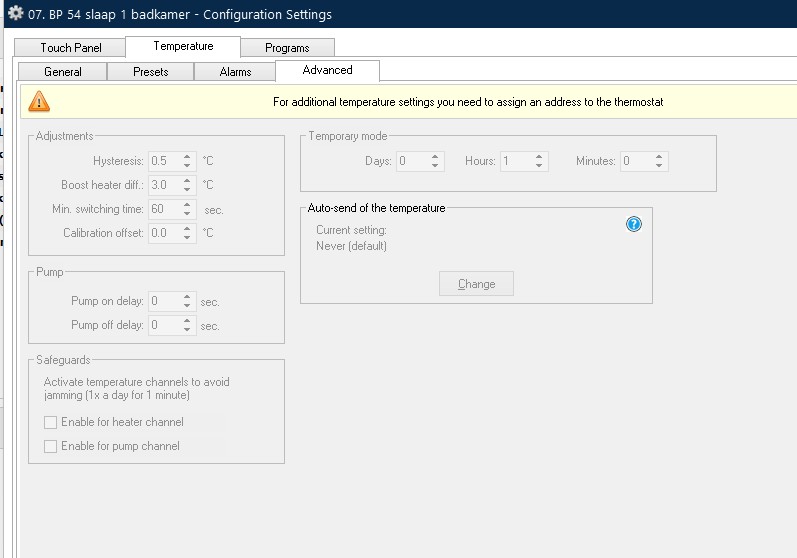
The Configuration Settings screen of the glass panel looks like attached file. No “alarm” or “when above” as you mention. Am I looking at the wrong place ??
But to use the features you require, the thermostat needs activating.
Please right hand click on the glass panel module, choose “address”
Hopefully the panel will be preselected
Look at the bottom and you’ll see there is a Thermostat tick box.
Apply the new address and magically, eight extra trigger channels will appear on the module.
You can’t do any harm, please feel free to explore and try things.
I appreciate your experience with other systems, so I need to reassure you that you really can’t do any harm by trying things in Velbus.
(I’m trying not to just “give you the answer on a silver platter” so that you get the pleasure of discovering the power and simplicity of Velbus for yourself. But I will continue to support your learning journey)
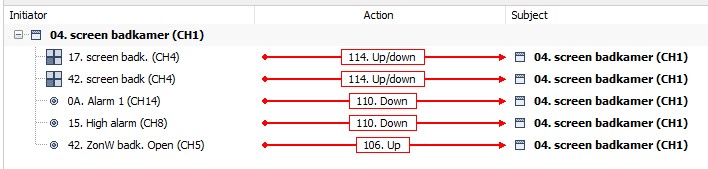
How to AND the “Alarm 1” from the glass panel with the “High alarm” from the PIRO so that the blind goes down when BOTH conditions are met ? Two actions 110. Down
I also configured virtual button 5 to drive the blind UP at given time, action 106. Up.
All actions on a specific “Subjects” are OR function, right?
How to get OR(AND(110.0 Down Alarm1; 110. Down High alarm);106.Up ZonW bak. Open)
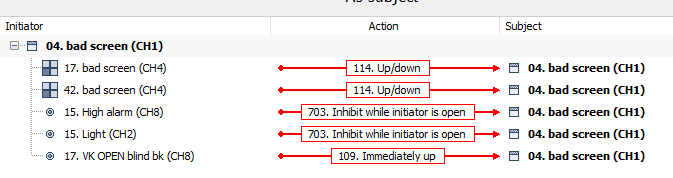
Is it one action “703. Inhibit while initiator is open” toward the blind for each of the n- sensors?
Something like in below screenshot?
But then were is the “113. Immediately down” action ??
Or is it some kind of chained link between de sensors?
Something like
Initiator: Sensor 1; Action: “703.Inhibit while initiator is open” ; Subject: Sensor 2
Initiator: Sensor 2; Action: “703.Inhibit while initiator is open” ; Subject: Sensor 3
Initiator: Sensor 3; Action: “113.Immediately down” ; Subject: motor blind
Since I don’t see the 07 group of actions I don’t think this is the way to go.
Since I’m not connected to the Velbus right now so that may also play a role.
Since I don’t have the Enigma machine to decrypt previous message, I’ll try to link it to what I configured yesterday evening.
Not sure if the blind will be closed when I come home this afternoon, let’s wait & see… …
Anyway:
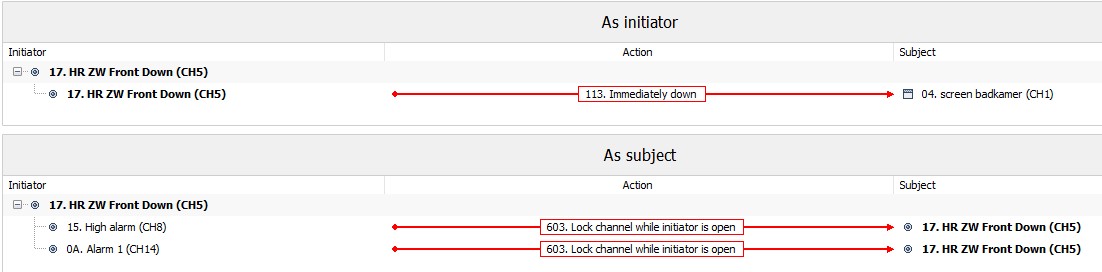
Thing = 04. Screen badkamer (CH1) = the blind
thing = 17.HR ZW Front down (CH5) = virtual relay of glass panel having address 17, the “go-between” as you mention in a previous post
So far so good
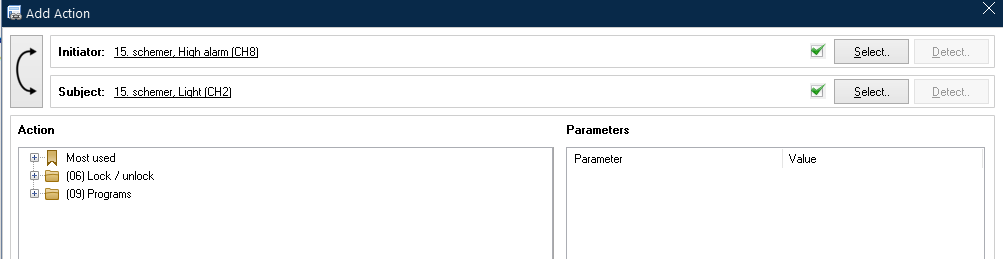
When configuring an action between the sensors “High alarm” (outside temperature) and “Alarm 1” (inside temperature) to the virtual relay I don’t have the 07 group, closest thing is the 06 group.
Blind is now controlled by:
a) Manually up / down via two glass panels, works fine
b) 1 hour before sunset Immediately UP, works fine while I
c) Via virtual relay “HR ZW Front down” Immediately down, no idea if that will work… …
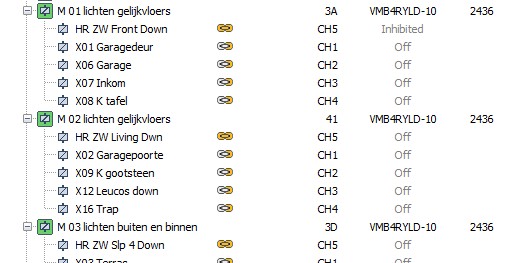
HR ZW Front Down is Inhibited; as expected GREAT
HR ZW Living Dwn is OFF; WHAT where is that coming from
HR ZW Slp 4 Down is OFF; WHAT where is that coming from
Where did I go wrong ??
Or are there any ghosts in the Velbus bus ?
(Again, understanding the fine details of actions and how they relate to each component)
Group 06xx is where the Subject is something like a Trigger.
Where you want to Lock the trigger
Group 07xx is where the Subject is something like an output device. (Or virtual relay)
Where you want to Inhibit it’s behaviour.
Inhibit is different to Forcing a state.
An Inhibit will be aware of other actions that might impact the required state, so that when the Inhibition is removed, the channel will go to the state requested be the last action.
Whereas, Forced 08xx, will ignore everything until released.
You are absolutely right; OFF is a valid state of a relay, no problem with that.
My biggest concern here is that with EQUAL inputs to 3 virtual relays they behave differently!
HR ZW Front Down is inhibited, that is correct since the “High alarm” condition is not met.
So why are the other 2 virtual relays in OFF state and not inhibited ?!!?
Like I said all 3 are “wired” equally; I expect them to react equally, read “get the same state”; don’t you ?
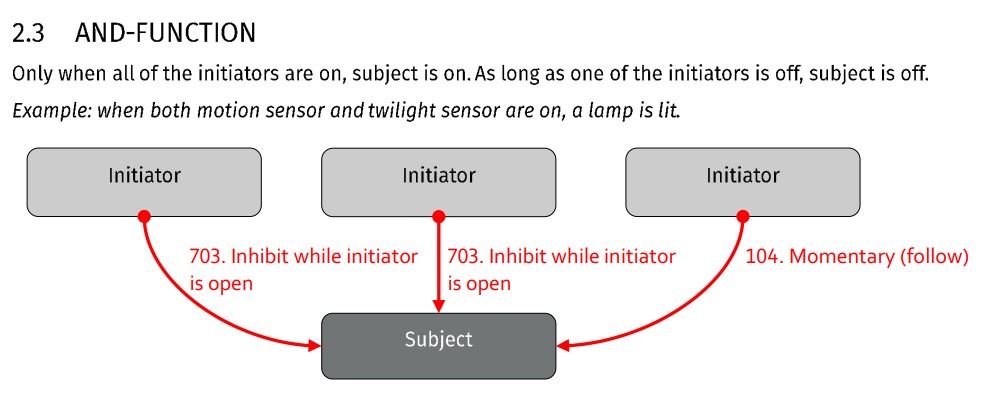
The way these 3 virtual relays are configured now matches below sketch from a Velbus document, right?
I tested this on “HR ZW Front Down” by changing the threshold values of the temperature inputs (High alarm” & “Alarm 1”).
It all looked great, virtual relay inhibited when conditions not met, when all met, the blind went down.
So I copied this to the other blinds with above problem as a result.

 …
…









 right ?