MDAR
June 25, 2025, 6:51am
21
You could try this udev rule that I’ve been playing with.
Pop this rule into your /etc/udev/rules.d/ folder
Give it a name like V80-Velbus.rules
SUBSYSTEM=="tty", ACTION=="add|change", ATTRS{idVendor}=="10cf", ATTRS{idProduct}=="0b1b", SYMLINK+="ttyVelbus-VMBRSUSB"

SUBSYSTEM=="tty", ACTION=="add|change", ATTRS{idVendor}=="10cf", ATTRS{idProduct}=="0b1c", SYMLINK+="ttyVelbus-VMBUSB-20"

SUBSYSTEM=="tty", ACTION=="add|change", ATTRS{idVendor}=="10cf", ATTRS{idProduct}=="0516", SYMLINK+="ttyVelbus-VMBSIG"
What should happen is that you get an extra symLink in your /dev folder
Depending on which USB device
/dev/ttyVelbus-VMBRSUSB
/dev/ttyVelbus-VMBUSB-20
/dev/ttyVelbus-VMBSIG
If the rule works on your system, this command should work
./velserv -d /dev/ttyVelbus-VMBRSUSB -p 6000
#######
Are you planning on using the velserv.service file to start it at boot?
1 Like
MDAR
June 25, 2025, 7:58am
22
I’ve just discovered this command
udevadm
Try using it like this to locate your Velbus USB device
udevadm info /dev/ttyACM*
udevadm info /dev/ttyUSB*
What you’re looking for is something with a VENDOR ID of 10cf
Probably a MODEL ID of 0b1b
This command will show you all the references to anything with Velbus or Vellemann in it, but what it won’t show is the bit of information about which tty symLink it’s pointed to.
udevadm info /dev/tty* | grep Vel
But at least you’ll know your OS can see the Velbus interface
If I run udevadm info /dev/ttyACM0 I get this
Look for the DEVLINKS & DEVNAME lines
P: /devices/platform/soc/ffe09000.usb/ff500000.usb/xhci-hcd.1.auto/usb1/1-1/1-1.3/1-1.3:1.0/tty/ttyACM0
M: ttyACM0
R: 0
U: tty
D: c 166:0
N: ttyACM0
L: 0
S: serial/by-path/platform-xhci-hcd.1.auto-usb-0:1.3:1.0                                                    S: ttyVelbus-VMBRSUSB
S: serial/by-id/usb-Velleman_Projects_VMB1USB_Velbus_USB_interface-if00
E: DEVPATH=/devices/platform/soc/ffe09000.usb/ff500000.usb/xhci-hcd.1.auto/usb1/1-1/1-1.3/1-1.3:1.0/tty/ttyACM0
E: DEVNAME=/dev/ttyACM0
E: MAJOR=166
E: MINOR=0
E: SUBSYSTEM=tty
E: USEC_INITIALIZED=6723644
E: ID_BUS=usb
E: ID_MODEL=VMB1USB_Velbus_USB_interface
E: ID_MODEL_ENC=VMB1USB\x20Velbus\x20USB\x20interface
E: ID_MODEL_ID=0b1b
E: ID_SERIAL=Velleman_Projects_VMB1USB_Velbus_USB_interface
E: ID_VENDOR=Velleman_Projects
E: ID_VENDOR_ENC=Velleman\x20Projects
E: ID_VENDOR_ID=10cf
E: ID_REVISION=0001
E: ID_TYPE=generic
E: ID_USB_MODEL=VMB1USB_Velbus_USB_interface
E: ID_USB_MODEL_ENC=VMB1USB\x20Velbus\x20USB\x20interface
E: ID_USB_MODEL_ID=0b1b
E: ID_USB_SERIAL=Velleman_Projects_VMB1USB_Velbus_USB_interface
E: ID_USB_VENDOR=Velleman_Projects
E: ID_USB_VENDOR_ENC=Velleman\x20Projects
E: ID_USB_VENDOR_ID=10cf
E: ID_USB_REVISION=0001
E: ID_USB_TYPE=generic
E: ID_USB_INTERFACES=:020201:0a0000:
E: ID_USB_INTERFACE_NUM=00
E: ID_USB_DRIVER=cdc_acm
E: ID_USB_CLASS_FROM_DATABASE=Communications
E: ID_VENDOR_FROM_DATABASE=Velleman Components, Inc.
E: ID_PATH=platform-xhci-hcd.1.auto-usb-0:1.3:1.0
E: ID_PATH_TAG=platform-xhci-hcd_1_auto-usb-0_1_3_1_0
E: ID_MM_CANDIDATE=1
E: DEVLINKS=/dev/serial/by-path/platform-xhci-hcd.1.auto-usb-0:1.3:1.0 /dev/ttyVelbus-VMBRSUSB /dev/serial/by-id/usb-Velleman_Projects_VMB1USB_Velbus_USB_interface-if00
E: TAGS=:systemd:snap_velbus-tcp_velbus-tcp:
E: CURRENT_TAGS=:systemd:snap_velbus-tcp_velbus-tcp:


(END)
MDAR
June 25, 2025, 7:59pm
25
Excellent.
Use that in your VelServ command line.
Or just use the VelServ.service file in the zip, that’s set to use that path
I’m curious why /dev/ttyACM0 didn’t work for you.
It suggests that “something else” has grabbed the device before VelServ.
Is it still being using in HomeAssistant?
nagisa
June 27, 2025, 9:33am
26
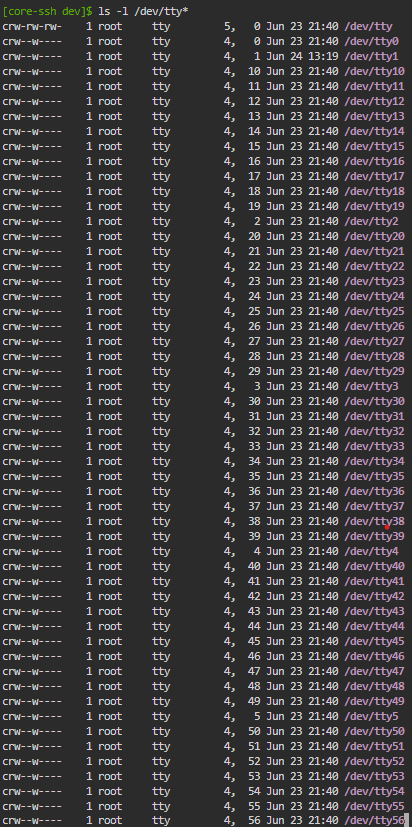
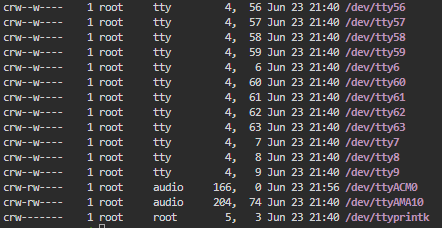
Or insufficient permissions. ttyACM0 is owned by root:audio with permissions u+rw,g+rw. If they’re trying to run velserv as user other than root or somebody in the audio group (the fact that ttyACM0 gets put with audio group at all indicates some wonky udev rules) they’d see this sort of error.
Can always ask nicely with some sudo for a try.
1 Like
A bit late here, but maybe check out this home assistant addon: GitHub - cereal2nd/hassio-velbusd: HASSIO addon to create a velbus proxy (the guy who created it, is also on this forum by the way
I use it in my setup, for connecting over tcp. Works great here.
On the missing modules, I suggest to delete the integration. Then add it again before going to bed. Then go to sleep, and have a look in the morning
2 Likes


 )
)