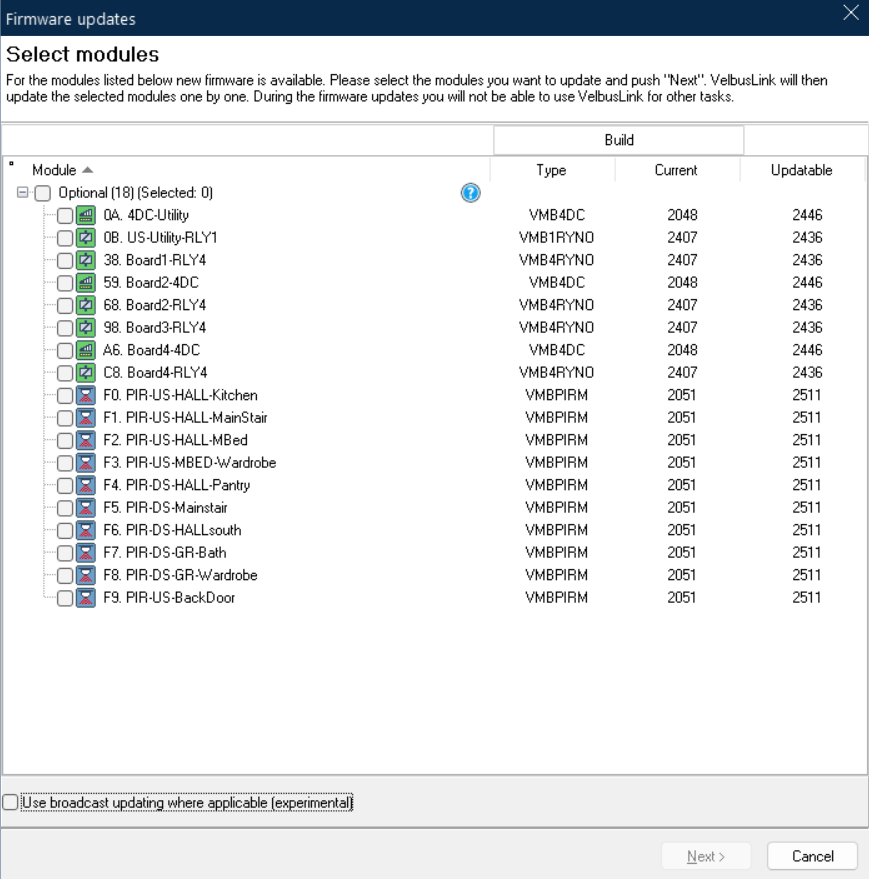
Exactly what @MDAR said. If you are not experiencing any issues with your installation, there is generally no need to update the firmware, unless VelbusLink indicates that an update is mandatory. Mandatory updates are clearly marked with an icon in the tree overview of your installation, so they are hard to miss.
Velbus uses a relatively slow bus speed, which is excellent for stability and reliability, but it also means that updating an entire installation can easily become a full-day job, especially when display panels are involved. For those, you can count on roughly 15–20 minutes per module.
So in short: if it ain’t broke, leave it alone. Unless we tell you otherwise. 
If you require faster firmware updates, we also have the experimental broadcast update feature (place Velbus in Advanced Mode and tick the box ‘experimental broadcast update’. With this, VelbusLink can broadcast the firmware update to all identical modules in the installation at once. This gives a significant speed advantage as soon as you have three or more identical modules, and the benefit increases with larger numbers.
Broadcast updating does require a very stable bus. If VelbusLink detects communication issues, it will fall back to the normal one-to-one update process. For that reason, the feature is still considered experimental. It is also only supported on the newer VMBxxx-20 generation modules.
Firmware updates are something that take time, and after updating we always recommend checking that the installation still behaves as expected, especially if several firmware versions were skipped. We do our very best to make sure VelbusLink handles all necessary migrations correctly, but there is always a chance that something unexpected slips through. If you do encounter anything unusual, please let us know through our ticket system so we can investigate it.
So if you decide to update, treat it as a proper maintenance task and allow enough time for both the update and the checks afterwards. In other words: probably not something to start “quickly” on a Friday at 4 PM. Unless you’re looking for an excuse to get home late.